Free Crystal Report Assessment
Get a professional review of up to 5 Crystal Reports for classes and/or consulting.
Request Your Assessment
Fill out the form below and we'll email you a private link to submit up to 5 Crystal Report Definitions for a professional review. Use the assessment for class recommendations and/or Crystal Reports consulting support.
Completely Free
No cost and no obligation.
Private & Secure
Your Report Definition contains report structure, not your live report data.
Classes & Consulting
Get guidance for training and/or one-on-one Crystal Reports consulting.
Your Live Report Data Is Not Sent
A Crystal Reports Report Definition contains the structure of your report—such as fields, formulas, parameters, grouping and formatting. It does not contain the live data displayed by your report.
A Crystal Reports Report Definition contains the structure of your report—such as fields, formulas, parameters, grouping and formatting. It does not contain the live data displayed by your report.
Submit up to 5 Report Definitions
Use your reports for class recommendations—including 2-Day Beginner/Intermediate, 2-Day Advanced, or the 3-Day Boot Camp—and/or for one-on-one consulting on your specific reports and needs.One complimentary assessment per verified email unless CTS authorizes another. Maximum 5 reports.
How It Works
Get your Crystal Report Definition and submit it in a few simple steps.
1
Fill Out the FormEnter your name, email and telephone, then click Email My Private Assessment Link.
2
Open Your Private AssessmentCheck your email and click the private CTS assessment link.
3
Open Your Report in Crystal ReportsOpen the .rpt file you want assessed.
4
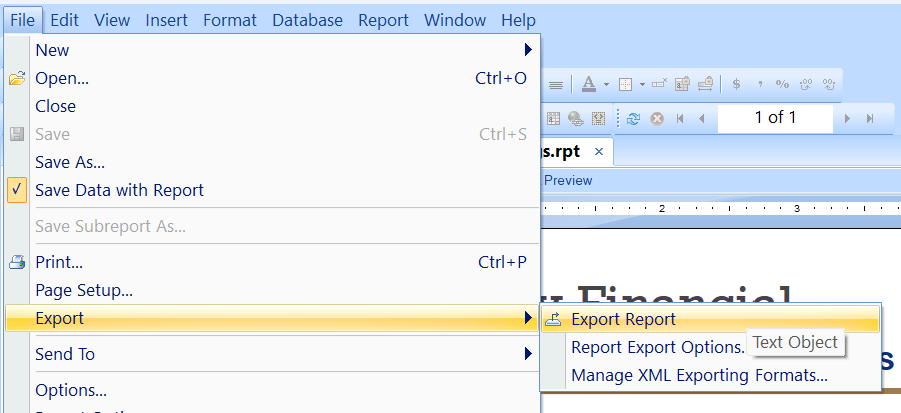
Export the Report DefinitionIn Crystal Reports choose File → Export → Export Report.
5
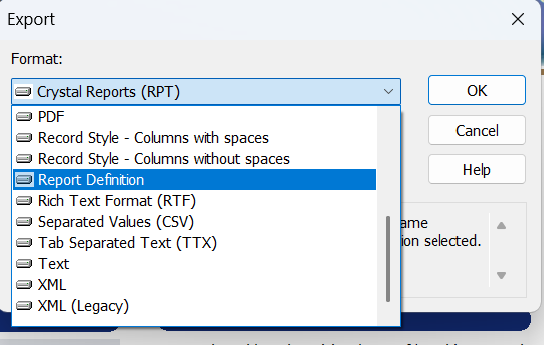
Select Report DefinitionIn the Format dropdown select Report Definition, then click OK.
6
Save and Open the Text FileSave the exported Report Definition. Open the file, select all of the text, and copy it.
7
Paste It Into Your CTS AssessmentPaste the complete Report Definition into the CTS box and click Analyze Report.
8
Review Your ResultsCTS analyzes the report structure and displays fields, parameters, formulas, grouping, sorting, subreports, running totals and other report features it can identify.